
LEXOGRINE HUD
Powered by « Lexogrine HUD Manager »
# Lexogrine HUD Fullfledged example of the React HUD made for HUD Manager. It has: - Custom actions - Keybinds - Player cam feed - Custom Radar ## Keybinds: ### **Left Alt + B** >Makes radar smaller by 20px; ### **Left Alt + V** >Makes radar bigger by 20px; ### **Left Alt + C** >Toggles camera feed ## **Panel** ## Trivia settings | Field|Description | |--|--| | Trivia title| `Text` | | Trivia content| `Text` | ## Display settings | Field|Description | |--|--| | Left/right box's title| `Text` | | Left/right box's title| `Text` | | Left/right box's image logo| `Image file` | ## Example settings 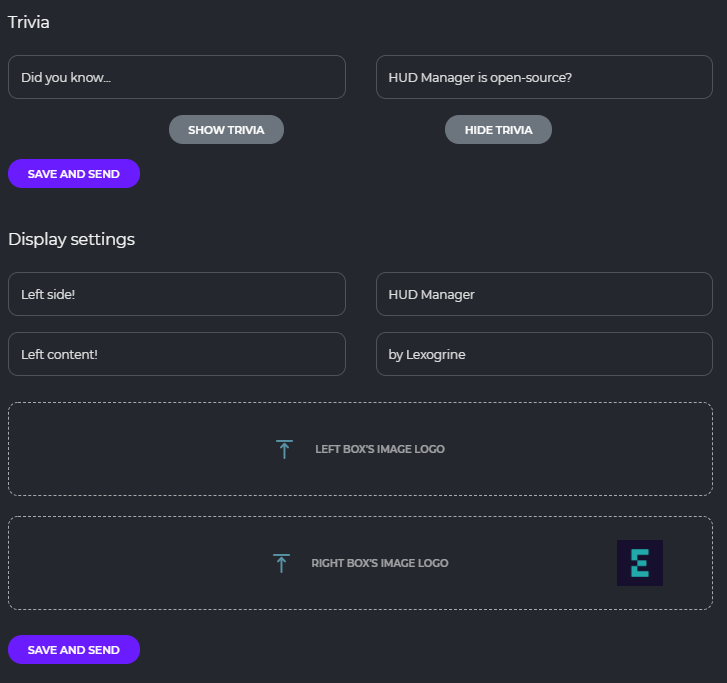 ## Preview  # Download To download it just click here: [DOWNLOAD HUD](https://github.com/lexogrine/cs2-react-hud/releases/latest) # Instruction ## Setting up Fork this repo, clone it, and then run `npm install` and `npm start`. HUD should start on the 3500 port. For this to work have HUD Manager opened so it will pass CS2 data to the HUD. ## Identifying HUD In `/public` directory edit hud.json so it fits you - fill HUD's name, author, version, specify the radar and killfeed functionalities. At the end replace the thumb.png with your icon :) ## Building & distributing To build version to distribute and move around, in the root directory run `npm run pack`. It will create the zip file for distribution. Now you can just drag and drop this file into the HUD Managers upload area. ## Signing To create Signed HUD to prevent at least from modyfing compiled Javascript files run `npm run sign`. It's the same as `npm run pack` command but with additional step of signing .js and .css files and hud.json. ## File structure The HUD is seperated into two parts - the API part, that connects to the HUD Manager API and communicate with it: `src/App.tsx` file and `src/api` directory. Usually, you don't want to play with it, so the whole runs without a problem. The second part is the render part - `src/HUD`, `src/fonts` and `src/assets` are the directories you want to modify. In the `src/HUD` each element of the HUD is seperated into its own folder. Styles are kept in the `src/HUD/styles`. Names are quite self-explanatory, and to modify style of the element you should just find the styling by the file and class name. ## `panel.json` API To get the incoming data from the HUD Manager, let's take a look at the `src/HUD/SideBoxes/SideBox.tsx` component: ```typescript const Sidebox = ({side, hide} : { side: 'left' | 'right', hide: boolean}) => { const [ image, setImage ] = useState